Making Soft Webcam Pitch Videos Look Client-Ready without Reshooting
() 08:38 PM CEST - Oct,21 2026
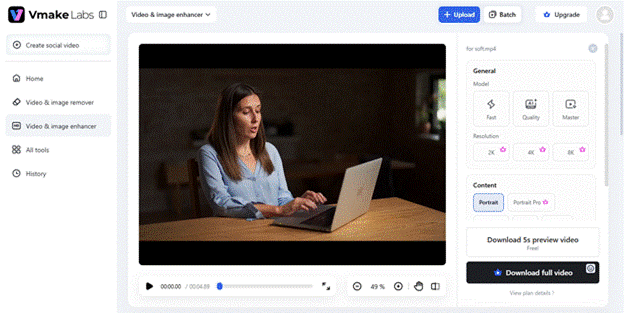
The framing was right, the energy was there, you hit every point in the pitch without stumbling — and it happened
to be recorded on a laptop webcam at 9pm with whatever light was left in the room. Now you're staring at soft
footage with noise in the shadows and a recording indicator or platform watermark sitting in the corner.
Reshooting sounds like the responsible move, except it usually isn't. You rarely land the same delivery twice —
the natural pacing, the ad-libbed line that actually worked, the energy of a first take — and re-recording burns
time you don't have before a client deadline. The better move, most of the time, is fixing what you've already
got.
A short post-production pass can strip out the artefacts and sharpen the footage in a fraction of the time a
reshoot would take. That's the gap Vmake Labs is built to close: it cleans up and enhances the raw take itself, so
the delivery that worked ships looking like it was shot properly the first time.
Here's the three-part cleanup that gets a rough webcam take to client-ready.
Phase 1: Fix the Facial Detail and Low-Light Noise
Most of the damage in a webcam pitch comes down to the sensor and the compression, not the lighting setup you
actually had. Standard 720p or 1080p webcams compress faces harder than anything else in the frame, which is why
you end up with muddy skin tones and visible noise on anyone who isn't sitting directly under a ring light.
Running the raw MP4 or MOV through a proper
video enhancer
with the right scene mode fixes most of this without making the footage look artificially retouched. Portrait Pro
mode is built specifically for this case. It sharpens facial detail and rebuilds skin texture in a way that reads
as natural rather than giving a smoothed-over, plastic look. If the issue is less about the face and more about a
dim, flat-looking room, Studio mode does more of the heavy lifting on contrast and lighting, giving an ordinary
home-office setup something closer to a cinematic look. And if the final file needs to hold up on a full-screen
display or a large client-side monitor, Master mode exports at 2K, 4K, or 8K, so nothing looks soft once it's
blown up.
Phase 2: Strip Out the UI Clutter and Watermarks
Now the visual quality is handled. The second common problem is a recording indicator, a screen-recorder logo, a
timestamp overlay, or a platform watermark that has no business being in a client-facing pitch. They show up
constantly in quick webcam recordings and screen-shared demos, and they are the fastest way to make an otherwise
polished video look like an internal draft that slipped out the door by accident.
This is where an
online video watermark remover
with a capable mode matters — specifically one built to handle moving indicators or watermarks sitting over a busy
background, like a slide deck or a presenter’s face, without leaving the blurry patches or smudged-out backgrounds
that cheaper removal tools tend to produce. Run it through Smart Pro mode, and these elements come out cleanly
enough that there is no visual evidence anything was ever there.
Phase 3: Check It before It Goes Out
Before the video ships, it's worth a quick pass to confirm the file is actually going to play cleanly wherever
it's landing — embedded in an email, sitting on a sales landing page, or shared as a direct link. It's easy to
enhance a video to a file size or format that chokes in an email client, which defeats the whole point of cleaning
it up in the first place. Same with audio: the enhancement pass only touches the visuals, so it's worth
double-checking that the sharpened footage still lines up with the original, uncompressed audio track rather than
drifting out of sync.
The Takeaway
Reshooting isn't actually necessary just because your best delivery happened to land on a mediocre camera. Enhance
the visuals, strip out whatever UI clutter got captured along the way, and turn what started as an informal webcam
take into pitch collateral that holds up in front of an enterprise client. If you've got a folder of decent
pitches sitting on rough footage, it's worth running them through Vmake Labs before writing them off as unusable.
 Updated:11:29 PM CEST Oct,21
(new)
Updated:11:29 PM CEST Oct,21
(new)

 Add your comment (free registration required)