Copying, moving, renaming, and deleting are far and away the most heavily used features within Windows Explorer, representing 50% of total command usage (based on Windows 7 telemetry data). For Windows 8, we want to make sure that using these core file management commands, which we collectively refer to as “copy jobs,†is a great experience.
We know from telemetry data (which is based on hundreds of millions of individuals opting in to provide anonymous data about product usage), that although 50% of these jobs take less than 10 seconds to complete, many people are also doing much larger jobs, 20% of which take more than 2 minutes to complete. Prior versions of Windows Explorer can handle these kinds of jobs, but Explorer isn’t optimized for high-volume jobs or for executing multiple copy jobs concurrently.
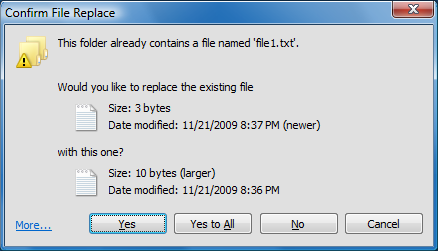
Usability studies confirm what most of us know—there are some pretty cluttered and confusing parts of the Windows 7 copy experience. This is particularly true when people need to deal with files and folders that have the same file names, in what we call file name collisions. Lastly, our telemetry shows that 5.61% of copy jobs fail to complete for a variety of different reasons ranging from network interruptions to people just canceling the operation.
last 10 comments:
Tom
(02:18 AM CEST - Aug,25 2011 )
I'd like to have those functions in my Windows 7. Make going through porn more efficient. :lol:
Koogle
(02:51 AM CEST - Aug,25 2011 )
What the Explorer team finally added pausing to the copy file dialog.. like just a couple OS generations delayed. At least the bloated mess that is vis7a replace file dialog:
...is looking a little more useful for media files.. still hopefully they slim that shit down for other files types to the more classic compact design:
And no doubt them geniuses will still forget to add an option that actually remembers to always display the 'More Details ' UI, everytime you transfer files.
lol the telementry data blurb :roll:
gx-x
(06:02 PM CEST - Aug,25 2011 )
well, they are like 10 years late but...at least it will be done. I hope file dialog options and size will be consistent to what user set them and not reverting to default every time they open...
(07:36 PM CEST - Aug,25 2011 )
Norton Commander -> Volkov Commander -> FAR -> Total Commander 8)
ggn
(11:18 PM CEST - Aug,25 2011 )
Unless I missed it, it's still not as sophisticated as Total Commander in error handling, i.e. giving you a chance to continue with an operation if an error occurs, like file in use or file cannot be read etc.
gx-x
(11:58 PM CEST - Aug,25 2011 )
ggn> Unless I missed it, it's still not as sophisticated as Total Commander in error handling, i.e. giving you a chance to continue with an operation if an error occurs, like file in use or file cannot be read etc.
If a normal error occurs you always had a "try again" option. If you HDD is dieing or is damaged then no error handling will help you.
Csimbi
(12:39 AM CEST - Aug,26 2011 )
quote: the upcoming operating system's revamped file copy interface.
And to think that this OS could not get any worse!
Goodbye Windows 8!
Kompressor
(01:44 PM CEST - Aug,26 2011 )
So is this the only new feature in Windows 8? It doesn't seem worth the upgrade.
Baconnaise
(03:28 PM CEST - Aug,26 2011 )
The only Windows specific installation I felt was an upgrade from it's predecessor was windows 2000. It had drawbacks to it even then like game performance etc. Anyways everything since has felt like nothing more than a big windows update so I didn't have to run windows update so much. If that makes sense to anyone :).
Csimbi
(06:46 PM CEST - Aug,26 2011 )
Baconnaise> The only Windows specific installation I felt was an upgrade from it's predecessor was windows 2000. It had drawbacks to it even then like game performance etc. Anyways everything since has felt like nothing more than a big windows update so I didn't have to run windows update so much. If that makes sense to anyone :).
I had issues with Windows 2000 so I did not use it, I went to XP right away.
Other than that, I fully agree. Just cosmetic rubbish, bugfixes, 8bit to 8/16bit, then to 8/16/32bit, then to 16/32bit, now to 32/64bit, some optimizations and performance losses and in the meantime they screw up the usefulness of the OS... Nothing much, really. BTW, XP isn't much faster than Win95 per se - it's just that most people had much better machines with more RAM when they switched... Just put Win95 on a PC with today's specs, you will see.
I wonder how much 16bit code is in their so-called 64bit OS...
gx-x
(07:20 PM CEST - Aug,26 2011 )
you all seem to have forgotten about all those re-installs of win98, XP...Windows 7 spoiled you :P
at least, it spoiled me, I reinstalled win 7 only once in last 2 years, my processes are still down in range of 50, depending on active software
Baconnaise
(07:45 PM CEST - Aug,26 2011 )
gx-x> you all seem to have forgotten about all those re-installs of win98, XP...Windows 7 spoiled you :P
at least, it spoiled me, I reinstalled win 7 only once in last 2 years, my processes are still down in range of 50, depending on active software
I reinstalled win98se all the time like a baws. I actually used ghost or other image software to install it back then since I did it so often.
That's why win2k was such an upgrade due to stability. Winxp of course the next upgrade since game support caught up.
I used to play with nt4 all the time even when you had to install third party software to get usb to work. Novell was my goto small server install though since it performed so much better.
Csimbi
(07:47 PM CEST - Aug,26 2011 )
I had to reinstall XP every three months in the beginning.
Over the years I found out how to keep it running without issues (how to do manual housekeeping), and during the last 2.5-3 years I did not have to re-install.
I had to reinstall Windows 7 already three times in 8 months because it is not letting you do things (like replace/remove/patch certain files/registry manually) due that idiotic built-in mechanism...
gx-x
(07:52 PM CEST - Aug,26 2011 )
Csimbi> I had to reinstall XP every three months in the beginning.
Over the years I found out how to keep it running without issues (how to do manual housekeeping), and during the last 2.5-3 years I did not have to re-install.
I had to reinstall Windows 7 already three times in 8 months because it is not letting you do things (like replace/remove/patch certain files/registry manually) due that idiotic built-in mechanism...
never head the need to "(like replace/remove/patch certain files/registry manually) due that idiotic built-in mechanism" so idk about that. All I do is disable indexing and automatic performance score update and it's all set. I do what I did on XP - avoid installing heap loads of junk appz that I don't really need or will need once a year. Hell, I even disconnect my DVD ROM since I rarely burn any discs...
Csimbi
(11:26 PM CEST - Aug,26 2011 )
Well, Windows 7 won't let you touch certain parts of the system, no matter what.
On XP, you could just delete system files, replace them and fix the registry.
This is not the case with Windows 7. Hence, housekeeping is difficult.
I turned off a lot more services, no need for many of those so why start them in the first place when it's going to simply exit after startup?
I have been using external DVD-ROM for nearly a decade now.
Koogle
(11:34 PM CEST - Aug,26 2011 )
quote: you all seem to have forgotten about all those re-installs of win98, XP...Windows 7 spoiled you :P
That's because Win7 is the approved spyware now that the majority have accepted it as being the safety net for security, and most computers are bundled with crap free (for a reason) antivirus spyware where they are all gives themselves free pass to use your connection to phone home about pc activities, not to mention intrusive shit as bundled by manufactures like dell etc to keep your pc safe lol.. Personally common sense and decent firewall like netlimiter does the job better than using and allowing win7 core os shit designed services services to do it. And the case of Win7 having to be reinstalled less is no more true than it was for Winxp for me (the only difference is that reinstalling Win7 is just more of a major fucking pain in the ass than WinXP ever was when taking into account all the things like slipstreaming patches), though I can see how the majority of users have less problems in fucking their pc up with malicious software etc.. they are just more conditioned to stay within their safely herded pens of mainstream browsing when using the internet or running files and dare go outside of that and their little dummIEs browser and shit antivirus spyware they have running will be letting them know, at what cost to privacy and data collection well that doesn't matter, yet.. at least until governmental gestapo legal state fascist dumb scum drone roaches come knocking at there door.
quote: my processes are still down in range of 50
....yeh just under 50 :) ...well that's not at all a fuckload of processes compared to Winxp :)
quote: I had to reinstall Windows 7 already three times in 8 months because it is not letting you do things (like replace/remove/patch certain files/registry manually) due that idiotic built-in mechanism...
Exactly on win7 x64 I had a problem with .exe files getting locked so applications that update were unable to delete their own .exe files, and you yourself are unable to delete folders with .exe files sitting in them immediately even though every other file gets deleted, even tools like Unlocker64 and the other lockhunter 64version don't work as these .exe files aren't in use by any other process or running (both common mistakes and the ones assumed by others when this problem has been reported by users), just shitting win7 64 being shit, as a minute+ delay is added, its like .exe files would disappear as if being deleted but a refresh of the folder would show them still. Turned out it had nothing to do with user file/folder security permissions or UAC shit being enabled and infact the culprit turned out to be service that have to be enabled and 'running' Application Experience (the description for this service: "Processes application compatibility cache requests for applications as they are launched") , not mention of if you don't want the lock delay in deleting .exe files don't turn off shit.. what a fucking great pointless change in added service bloat trying to make itself useful by crippling other things so that you have to have this stuff running.
Anyway I do use win7 now as default OS still many things I miss from XP and I do still go back to it from time to time, its just the balance is overal in favor of using Win7 now, and so long as Win8 works on improvements to explorer shell like the above features and not other useless cloud infesting shit, and further pointless changes in user dumbification that they were showing off earlier this year then I'm sure many enthusiasts will upgrade as many extensions and application that work on win7 now, will most likely not have problems with win8. I still think those ms explorer team slackers should add a column to show folder size, bet if they do they make a condition that you have to use that there crap search 'indexing service'(prefer 'search everything' much better) that many disable.. .. instead of making a service that just does what extension foldersize (foldersize.sourceforge.net) used to do.
Csimbi
(03:39 AM CEST - Aug,27 2011 )
Yup, W7x64 here as well.
I am developing apps as a hobby, so it's very annoying that every now and then I get an error that the EXE cannot be written (because it cannot be deleted when I compile again).
Just ridiculous, especially when you advertise this s**t as "more productive" than XP. I found quite the opposite...
Did you ever try to save a document/file to C:\? Did you actually find the file afterwards? Just sad. All in the name of the non-existent security...
I wonder how long will it take to fix all the annoyances... Probably forever... Perhaps Windows Forever 512bit, or, Cubes Forever 512bit if it ever gets 3D.
Baconnaise
(09:57 AM CEST - Aug,27 2011 )
Odd I have this problem with media player. I should get off my ass uninstall media player since I use vlc or another player most of the time. THe other annoyance due to laziness is that the media player gadget still shows as a process even though I use classic them and supposedly have gadgets disabled.
This is the problem it's a never ending struggle to reclaim resources and if you don't stay on top of it they bend you over even if a little bit. Sad thing is I use the same things in windows over ten years ago yet it's gotten more bloated. It's pretty sad that my major reason for upgrading is usually the OS so I can play newer games not to mention retain driver support.
I still have 7800gtx 512mb cards and 8800gtx cards that run new games just fine. I'm still using directx 9 for every single game. What has dx10 and dx11 done? Why would I care about shadows? That's the biggest hog and usually what the newest dx versions improve if even used.
Csimbi
(04:30 PM CEST - Aug,27 2011 )
I used media player only once. Then, I installed VLC and dropped the MS rubbish.
Baconnaise> What has dx10 and dx11 done? Why would I care about shadows? That's the biggest hog and usually what the newest dx versions improve if even used.
Rendering billions of invisible triangles and useless shadows became more important in games recently than the fun and replay factors. This is a big problem with the gaming industry today. They invest millions in graphics which pushes up the price of the game. The customers buy the game and they are sorely disappointed because they did not get a good game; they got a flashy one. I do hope that the small game houses continue to provide value and the big ones will recognize the issue. Torchlight vs Diablo is a very good example.
 Updated:08:10 PM CEST Jun,05
(new)
Updated:08:10 PM CEST Jun,05
(new)


 Add your comment (free registration required)