 Updated:01:31 PM CEST Jun,07
(new)
Updated:01:31 PM CEST Jun,07
(new)

66 lottery login
91 club
okwin
bdg game
55 club

(c) 1998-2026 Gameguru Mania
Privacy Policy statement
|
BioShock Performance - Mainstream Cards - tech|
| (hx) 05:24 PM CEST - Aug,29 2007 | 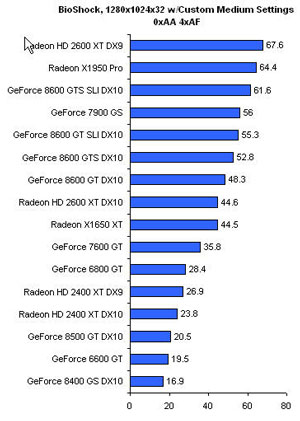 | | For maximum performance with the basline medium settings, you may want to turn off shadow maps and post processing |
|
Looking for an inexpensive GPU upgrade for BioShock?
FiringSquad tested some mainstream graphics cards ranging from the GeForce
6600 GT up to the GeForce 8600 GTS. Here're results:
While it certainly doesn't hurt to have the latest high-end DX10 GeForce or
Radeon graphics card, clearly you don't have to spend $400 or more to truly
enjoy BioShock. With a just a couple of tweaks here and there, a $150-$200
card should be able to deliver very playable frame rates without
compromising too much on image quality. The game's medium quality graphics
setting really does a good job of balancing good image quality with high
performance. However, if you simply must have the best image quality possible,
you're going to have to game at lower resolutions like 1280x1024 with today's
latest DX10 mainstream cards. The Radeon X1950 Pro also continues to put up a
strong showing too by the way.
Based on the results we've seen up to this point, it looks like NVIDIA's DX10
driver for BioShock is giving their cards the performance advantage under the
game's DX10 path, but clearly the Radeon HD 2600 XT is no slouch in this game
once it is running under the DX9 codepath. As we noted earlier in this
article, performance improves by a factor of up to 1.5X under DX9. This is
simply an enormous performance improvement and we're hoping AMD can eventually
bring the performance of their DX10 driver closer to this point in the game.
In all honesty though, BioShock 1.0's DX10 bug is probably a blessing in
disguise. Why? Because the water ripples running in DX9 mode look terrible!
While you can make an argument that the soft particles and especially the crisp
shadows found in BioShock's DX10 path can be difficult to spot at times, you
literally can't miss the difference between DX9 and DX10 water ripples. It
really is a night and day difference! Now some of you may be thinking that
dynamic water ripples aren't a big deal, but water is present everywhere in
this game - you are roaming around in a underwater city after all. If you
just shelled out the money for a DirectX 10 graphics card, you really owe it to
yourself to at least check out BioShock's dynamic water ripples. Once you've
seen how the game looks without them, it's pretty tough to go back.
Ed.note: I also recommend you to check out
this
BioShock tweaking guide. |
|
last 10 comments: | El_Coyote | (09:29 PM CEST - Aug,29 2007 ) | | nice to see some tests that include other than nVidia hardware |
|
| Ravenheart | (11:35 AM CEST - Aug,31 2007 ) | | I hope 3GB of ram will be enough to crank the gfx on my 7600GT (upgrade next week :D ). |
|
| (11:48 AM CEST - Aug,31 2007 ) | Ravenheart> I hope 3GB of ram will be enough to crank the gfx on my 7600GT (upgrade next week :D ).
My 6800GT will be probably too slow for this game :(
I've decided to wait for the Penryn and G92 (November) ...to be able to play CoD4, Crysis smoothly :D |
|
All comments
|
|
)
 Add your comment (free registration required)